Managing PostgreSQL Schema Changes with pg_schemadiff
A practical guide to building a simple database migration system using pg_schemadiff, explaining how to structure a project, write schema definitions, and use a migration script to plan, apply, and track database changes safely.

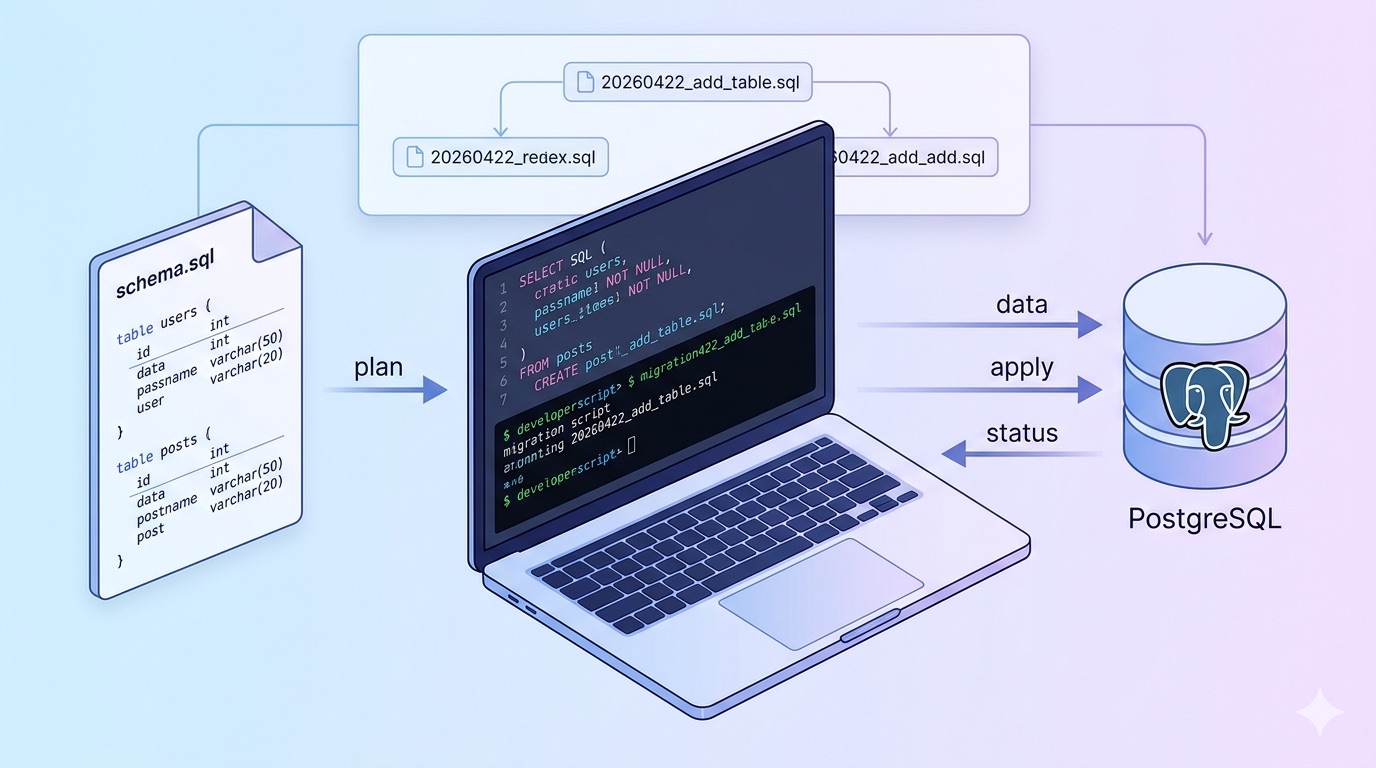
After two descriptive articles, we’ve finally reached the point of solving this problem in a practical way. If you haven’t gone through the first two articles, please do that before coming to this one.
At the beginning, you need to install pg_schemadiff. You can follow their official documentation to complete the installation.
After completing the installation process, you need to create a project for database migrations. So let’s create a simple project for that. Basically, it includes a migrations.sh file, a .env file, and a database folder that contains the schema.sql. This is the folder structure for a simple database migration project.
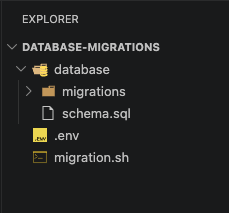
Let’s take a look at the purpose of the migrations.sh file.
The migration script has three commands:
./migration.sh plan   [name]   # generate a migration file
./migration.sh apply           # apply pending migrations
./migration.sh status          # check what's applied and what's pending
plan
This is the core step. It runs pg_schemadiff and compares your schema.sql against the actual database. If it finds differences, it generates a .sql migration file inside database/migrations/ with a timestamp prefix like 20260422_143201_add_column.sql. If there are no differences, it deletes the empty file and tells you the database is already up to date, which is the exact silent failure your article 1 was about, but now made explicit.
apply
Goes through every .sql file in database/migrations/ in chronological order and checks the _migration_history table to see which ones have already been applied. It only runs the pending ones. After each successful migration it records the filename in _migration_history so it's never applied twice. If one fails, it stops immediately and tells you which file to fix.
status
Reads all migration files and checks each one against _migration_history. Prints a table showing which are applied (with timestamp) and which are still pending. Useful before deploying to confirm your database is in the state you expect.
The _migration_history table This is why schema.sql includes it. The script uses it to track which migrations have been applied. It lives in the database itself so the state is always accurate regardless of which machine runs the script.
And the .env file contains the database url.
The schema.sql file has four parts:
Extension
CREATE EXTENSION IF NOT EXISTS pgcrypto;This enables PostgreSQL's pgcrypto extension which provides the gen_random_uuid() function used for automatic ID generation. This is exactly the function that the ORM silently skipped in article 1.
Migration history table
CREATE TABLE IF NOT EXISTS public._migration_history (
    filename VARCHAR(255) PRIMARY KEY,
    applied_at TIMESTAMP WITH TIME ZONE NOT NULL DEFAULT now()
);
This is the table the migration script uses to track which migrations have already been applied. Every time a migration runs successfully, its filename gets recorded here so it's never applied twice.
Users table
CREATE TABLE IF NOT EXISTS public.users (
    id UUID PRIMARY KEY DEFAULT gen_random_uuid(),
    email VARCHAR(320) NOT NULL UNIQUE,
    full_name VARCHAR(255),
    created_at TIMESTAMP WITH TIME ZONE NOT NULL DEFAULT now(),
    updated_at TIMESTAMP WITH TIME ZONE NOT NULL DEFAULT now()
);
A straightforward users table. The id column uses gen_random_uuid() to automatically generate a unique UUID for every new row — no application code needed.
Posts table
CREATE TABLE IF NOT EXISTS public.posts (
    id UUID PRIMARY KEY DEFAULT gen_random_uuid(),
    user_id UUID NOT NULL REFERENCES public.users(id) ON DELETE CASCADE,
    title VARCHAR(255) NOT NULL,
    content TEXT,
    created_at TIMESTAMP WITH TIME ZONE NOT NULL DEFAULT now(),
    updated_at TIMESTAMP WITH TIME ZONE NOT NULL DEFAULT now()
);
A posts table with a one-to-many relationship to users, one user can have many posts. The REFERENCES public.users(id) line is the foreign key, and ON DELETE CASCADE means if a user is deleted, all their posts are automatically deleted too. This is the relationship type that ORMs also silently miss during migrations.
Now you have to run this command in your terminal,
./migration.sh plan add-tablesSo then you can see there is a migrations folder created inside the database folder, along with a migration file. This is the file we use to create, update, and delete things in the database.
So then you can run this command to apply the changes to the database.
./migration.sh applyAnd after that, those changes are applied to the database. You can see the changes being applied in the terminal, and you can check the status of the migration files by running this command.
./migration.sh statusNow let’s make a change to our existing table. So I have a user table like this.
CREATE TABLE IF NOT EXISTS public.users (
    id UUID PRIMARY KEY DEFAULT gen_random_uuid(),
    email VARCHAR(320) NOT NULL UNIQUE,
    first_name VARCHAR(255),
    last_name VARCHAR(255),
    created_at TIMESTAMP WITH TIME ZONE NOT NULL DEFAULT now(),
    updated_at TIMESTAMP WITH TIME ZONE NOT NULL DEFAULT now()
);
I’ve changed the full_name column to first_name and added a new column for last_name. Now, run the above commands sequentially like this.
./migration.sh plan update-users-tableThe new migration file is now created. Next, run the apply command. You’ll see the changes being applied to your database. After that, check the status of the migrations.
This is a simple database migration project, but you can extend it into something much more powerful depending on your needs, such as supporting multiple schemas, environments, or more advanced migration strategies.
I hope this article series helped you understand the concept and gave you a practical starting point. If you run into any issues or have questions, feel free to reach out to me via email.
Part of the Database migration tutorial series
View all partsRelated Posts
- 4 min read
Why I Let the Database Own Its Own Schema
How ditching the ORM translation layer and letting PostgreSQL own its schema solved the drift problem for good.
SQLAlchemyDatabase MigrationPostgreSQL - 4 min read
The Empty Migration File That Changed How I Manage Databases
How a silent empty migration file taught me that SQLAlchemy was never meant to own my database schema.
SQLAlchemyDatabase MigrationPostgreSQL